AI Email Assistant That Writes Like a Human
Sign in to Televanta, connect Gmail or Outlook, and answer email from one place. The AI email assistant suggests the reply, you review it and send.
See the AI Email Assistant in Action
A dashboard for every inbox metric, assistants you can spin up in minutes, suggested replies next to the original email, and transparent usage across every mailbox.
Every email metric that matters in one view
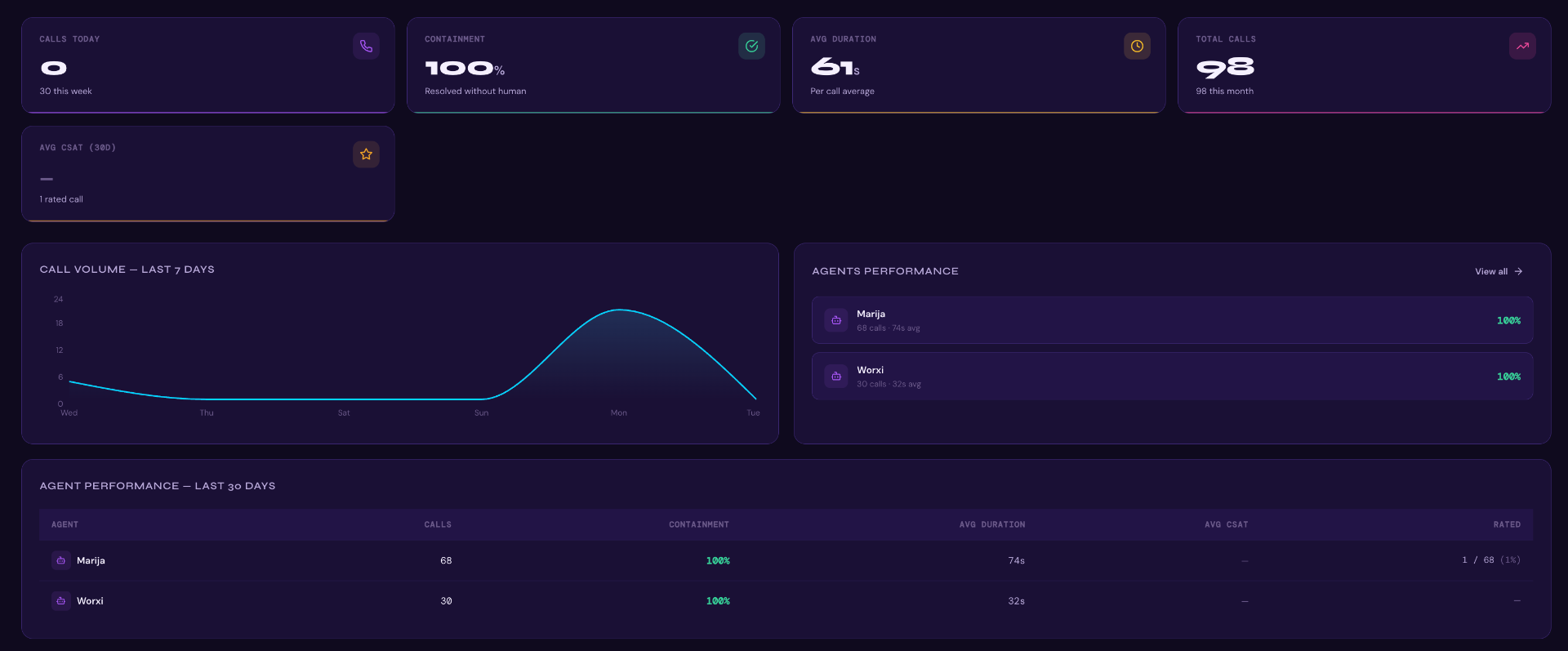
- Emails handled today
Real-time counter with a 7-day trend to spot inbox spikes instantly.
- Auto-resolution rate
See what % of threads Televanta closes without a human touch.
- Avg reply time & volume
Per-thread response time and monthly volume tracked side-by-side.
- Assistant leaderboard
Compare every email assistant by threads handled, response time, and CSAT.
How the AI Email Assistant Works
Three steps: sign in to Televanta, connect your inbox, and answer email with suggested replies. A human always reviews and sends.
Sign in and connect your inbox
Log in to Televanta and connect Gmail or Outlook via OAuth in minutes. Shared mailboxes, labels, and signatures included, with zero IT work.
Televanta learns your style
The AI email assistant reviews past resolved threads and your knowledge base to understand exactly how your team communicates.
You review and send
Every email arrives in Televanta with a suggested reply. You review it, edit if needed, and send with one click. Nothing goes out without your approval.
Email Assistant That Suggests. You Review and Send
Gmail & Outlook native
OAuth connection to Gmail, Workspace, Outlook, and Microsoft 365 in minutes.
Trained on your voice
Learns from resolved threads, your knowledge base, and tone guidelines.
Intent classification
Every email tagged by intent, priority, and the right workflow.
Attachments understood
Reads invoices, IDs, screenshots, and PDFs and uses them in the suggested reply.
You send, not the AI
Televanta prepares the draft inside the platform. You review, edit, and send it in one click. Nothing is sent without your approval.
CRM & helpdesk sync
Two-way sync with HubSpot, Salesforce, Zendesk, Intercom, and more.
Why Companies Love the AI Email Assistant
“No more unanswered emails.”
“A simple, effective dashboard that allows me to see all emails with AI Assistant in one place.”
“Televanta is the employee you can never hire.”
How the AI Email Agent Drafts a Response
Every suggested reply is built from your own material, not from a generic model guess.
Reads the whole thread
The assistant parses the full conversation, attachments included, so the draft answers the actual question rather than the last line of the email.
Classifies the intent
Billing, refund, booking, complaint, or sales. The intent decides which policy, template, and system lookup the draft is built from.
Grounds the answer in your data
Facts come from your knowledge base and connected CRM or helpdesk records, so order numbers, dates, and policies in the draft are real.
Writes in your team's voice
Tone, greeting, and sign off are learned from past resolved threads, and every edit you make feeds back into the next draft.
If the answer is not in your knowledge base, the assistant researches open source and public material to find the best possible answer and flags the source, so the reviewer can verify it before pressing send. For a longer walkthrough, read Best AI Email Assistant.
Sorting and Triage Before Anyone Opens the Inbox
The queue is already ordered by intent, priority, and owner when your team signs in.
Intent and priority tagging
Each email is labelled by intent and urgency the moment it arrives, so the queue is ordered by what matters instead of by arrival time.
Routing to the right mailbox
Support, billing, and sales threads land with the right owner or shared inbox, including aliases and forwarded addresses.
Language detection
Incoming email is detected across 30+ languages and the suggested reply is drafted in the sender's language.
Thread and duplicate grouping
Follow ups, re-sends, and duplicates are merged into the original thread so two people never answer the same customer.
Escalation flags
Angry, legal, or high value threads are flagged for a human first, with the reason for the flag shown next to the draft.
Searchable history
Every email, draft, edit, and sent reply is logged, so managers can audit what the assistant proposed and what actually went out.
What an AI Email Agent Costs
Priced on mailboxes and monthly email volume, not per seat, so a shared inbox is never charged twice.
Priced on volume, not seats
Cost is based on connected mailboxes and monthly email volume, so a shared inbox worked by five people is charged once.
One quote, no per-user creep
You get a fixed monthly price for your volume band. Adding reviewers to the platform does not change it.
Runs alongside call and chat
Email can be added to an existing Televanta call or chat deployment on the same contract and the same knowledge base.
See Televanta pricing or request a quote for your mailbox count and monthly volume.
Further Reading on AI Email Assistants
Guides that walk through setup, comparison, and how to get reliable replies from your inbox.
Setting Up an AI Email Agent: A Step by Step Guide to Automatic Replies
Connect your inbox, write scenario-based instructions, and configure the assistant to draft replies in your business voice.
Best AI Email Assistant
What an AI email assistant is, how it works, what it costs, and when it beats a human agent.
AI Email Assistant FAQ
Everything you need to know before going live with Televanta.
Televanta's AI email assistant is a platform you sign in to, connect your Gmail or Outlook mailbox, and answer email from. The AI reads every email, identifies intent, and suggests a reply grounded in your knowledge base. You review it, edit it, and send it. Nothing is sent without human approval.
Inbox under control. Always.
Go live in days, not months. Book a 20-minute demo and see Televanta answer your calls in your voice, your language, your workflow.