
WhatsApp has become one of the busiest channels a business has, and it rarely slows down. Customers send pricing questions at midnight, ask about order status on their lunch break, and expect a reply almost as fast as if they were texting a friend.
Handling that volume by hand is not realistic for most teams, and this is exactly where an AI WhatsApp agent earns its place. Televanta's WhatsApp Agent is built to manage both sides of that conversation, reading and answering incoming messages while also sending outbound updates, reminders, and campaigns on your behalf.
This post walks through how that setup actually comes together, starting with connecting your phone number, moving into the prompt that shapes every reply, and finishing with the specific scenarios that separate a useful agent from a generic one.
What is an AI WhatsApp agent?
An AI WhatsApp agent is a tool that reads messages coming into your business WhatsApp number and responds based on instructions you have defined in advance. It lives inside Televanta's broader AI communication platform, working alongside the voice and email agents so every channel pulls from the same underlying knowledge about your business.
What makes WhatsApp different from email or voice is the mix of inbound and outbound activity happening at once. A customer might message in with a question while your business is simultaneously sending out an appointment reminder or a promotional update to a completely different contact, and the agent needs to manage both directions without missing a beat.
Step one: hook your phone number to the agent
Before any automation can begin, the agent needs a connected number to work from. Televanta links to your business WhatsApp number through the official WhatsApp Business API, so the number you connect is the same one your customers already recognize and trust.
It is worth using a dedicated number for this rather than the same line your team uses for personal chats or internal coordination. Keeping the two separate makes it much easier to track how the agent is performing and prevents automated replies from ever mixing with informal internal messages.
Once the connection, often called hooking the number, is live, every inbound message is picked up the moment it lands. There is nothing new for your customers to download or learn, since they are simply messaging the number they already have saved.
From that point forward, the agent is watching the conversation continuously rather than waiting for someone to open an inbox. That continuous presence is what allows a WhatsApp agent to answer at two in the morning just as reliably as it does at nine in the morning on a Tuesday.
The connection is the foundation for everything else. Without a reliable link through the official Business API, even the best instructions cannot produce replies on time, because the agent never sees the messages it is supposed to handle.
Step two: build the prompt and response guidelines
Connecting the number only creates the pipe the messages flow through. The real behavior of the agent comes from the prompt, which is the set of written instructions that tells it exactly how to handle what comes in.
Think of the prompt the way you would think about training a new team member on their first shift answering WhatsApp. You would not hand them the phone and walk away, because they would have no idea what tone to use, which questions they can answer confidently, and which ones need to be passed along to someone else.
State how replies should sound. A casual boutique and a medical practice should never sound the same when replying to a customer on WhatsApp.
Name what actually shows up in your inbox, such as pricing questions, frequently asked questions, appointment requests, and order related messages.
Replace vague instructions like be helpful with exact rules for each scenario so the agent never has to guess at a reply.
Handling inbound messages: building real scenarios
Naming a category is only half the setup. The other half is spelling out exactly what a good reply looks like for each one, and this is where the agent starts to feel genuinely useful rather than generic.
Acknowledge, add context, and ask follow-ups
Someone asking about cost should never get a flat number with no context. The agent acknowledges the specific product or service, briefly explains what is included, and asks a clarifying question when the real answer depends on details the customer has not shared. When pricing depends on undefined variables, it flags the conversation for a team member instead of guessing.
Answer only from approved information
Most WhatsApp inboxes see the same questions on repeat: business hours, location, delivery times, or how a service works. The prompt gives the agent a clear source of approved answers and tells it to stick to them. For anything outside that source, the agent admits uncertainty and offers to connect the customer with a person, which builds far more trust than a confident but incorrect guess.
Confirm, offer slots, and restate details
Appointment requests carry urgency because the customer is usually ready to commit right now. The agent confirms the appointment type, offers available times if a calendar is connected, and restates the details already given. If staff confirmation is required, it sends an immediate acknowledgment while a person locks in the slot.
Lead with empathy and escalate fast
Complaints and sensitive messages deserve a noticeably different tone than routine questions. The agent leads with empathy, avoids anything that sounds scripted, and prioritizes these conversations for fast human follow up rather than treating them like a standard inquiry.
Outbound communication and template based messaging
Inbound handling is only one side of what a WhatsApp agent does. The other side, sending messages out to customers, works a little differently because of how WhatsApp itself is built.
Outside of an active conversation, WhatsApp requires businesses to use pre approved message templates for anything they send first. This exists to prevent spam, and it means outbound campaigns, reminders, and notifications need to be built around a fixed template structure rather than free form text.
Televanta's agent is set up to work within that structure rather than around it. You define a library of approved templates for common outbound needs, and the agent fills in the personalized details for each recipient automatically.
Once a customer responds to a template message, the conversation naturally opens back up, and the same inbound guidelines you set earlier take over from there. This is what makes the two sides of the system work together instead of functioning as separate tools, since a promotional message that gets a reply flows directly into the pricing or FAQ handling you already configured.
Slots for the customer's name, appointment date, and booked service, filled in from your actual records so no shows drop without anyone sending reminders by hand.
Status notifications with the order details personalized per recipient, sent automatically as orders move through your system.
A compliant template that references the specific product left behind, turning a generic reminder into something that feels tailored.
Campaign templates that stay within WhatsApp's rules while the specific offer or product mentioned can still feel relevant to the person receiving it.
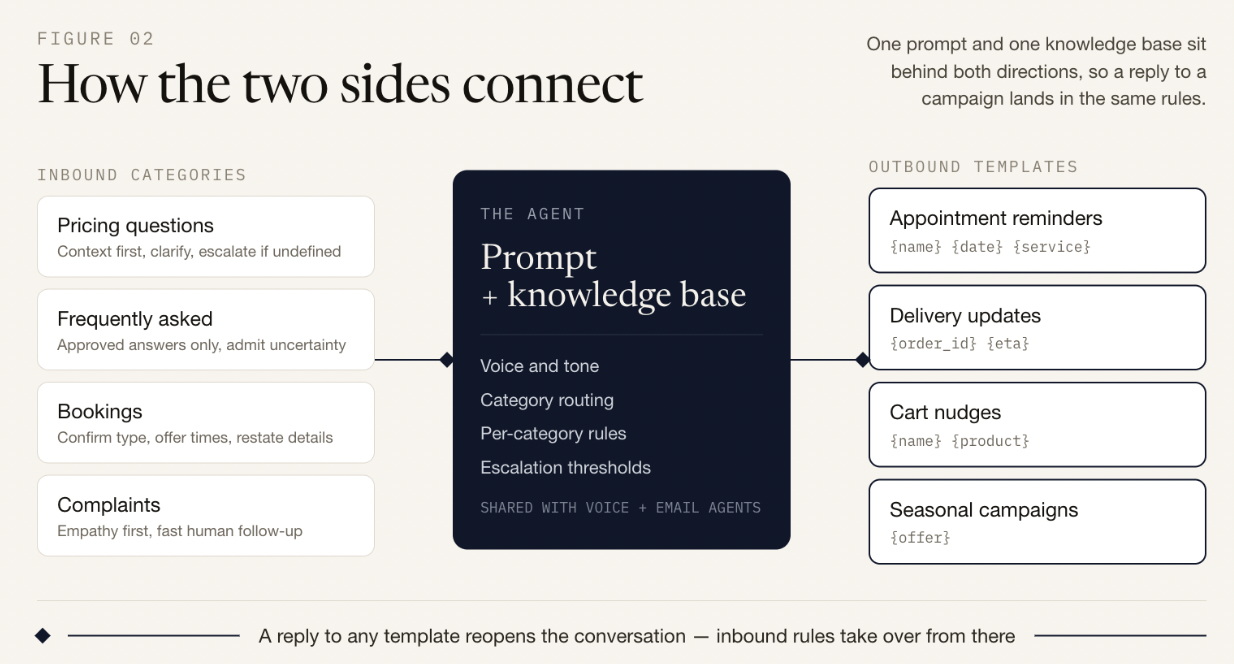
One prompt and one knowledge base sit behind both directions, so a reply to a campaign lands in the same rules that govern every other conversation. Whatever category a message falls into, pricing, frequently asked questions, bookings, or complaints, it is handled by the same logic whether it started as an inbound question or a reply to an outbound reminder.
Why do businesses use an AI WhatsApp agent?
The case for automating this channel comes down to speed and consistency. WhatsApp conversations move quickly, and customers expect a response in minutes rather than hours.
An agent that reads every message the moment it arrives removes the lag that builds up when a shared inbox gets busy. It also means the same accurate answer goes out every time a pricing or FAQ question comes in, rather than depending on which team member happens to be free.
On the outbound side, template based messaging lets a business stay in touch at scale without a person manually sending hundreds of individual reminders or promotions. Appointment no shows drop when reminders go out automatically, and campaigns reach every intended recipient without anyone copying and pasting the same message over and over.
Testing the setup before going live
Once the categories and templates are in place, it is worth resisting the urge to switch everything on all at once. Send a handful of test messages covering each inbound scenario you defined and review the replies closely before real customers see them.
Pay attention to tone that feels slightly off, missing information, or a category the agent is sorting incorrectly. It also helps to send a few outbound templates to an internal number first, just to confirm the personalization fields are pulling the right details before a full campaign goes out to your actual customer list.
A complete test set should include one pricing message, one FAQ, one booking request, and one complaint, plus a couple of outbound templates to an internal number. If any of those feel wrong, the instructions for that category need more detail.
Why choose Televanta?
Televanta's WhatsApp Agent is built as part of a wider platform that also runs voice calls and email, which means the same knowledge base and business rules carry across every channel a customer might use. A pricing rule you define once applies whether the question comes in through WhatsApp, a phone call, or an email.
The platform is also built with strict separation between businesses, so each company's conversations, templates, and customer data stay isolated from every other business on the system. For companies handling sensitive information, that separation matters as much as the automation itself.
Bringing it all together
Automating WhatsApp does not mean losing the personal feel that makes the channel valuable in the first place. It means being deliberate about how your business shows up, both when a customer messages in and when you reach out first.
Start by hooking your phone number, then build a prompt that defines your tone, your message categories, and specific rules for handling pricing, FAQs, bookings, and complaints. Layer in a set of approved templates for the outbound side, covering reminders, updates, and campaigns, and let the agent handle the personalization for each recipient.
That combination, careful inbound guidelines paired with template based outbound messaging, is what turns a WhatsApp number from a channel your team struggles to keep up with into one that runs smoothly around the clock. If you want to see it in action, book a demo and we will walk you through a live setup.
Common questions about AI WhatsApp agents
An AI WhatsApp agent reads messages coming into your business WhatsApp number and responds based on instructions you define in advance. It also sends outbound messages like reminders, updates, and campaigns using pre approved templates, so both sides of the conversation are covered.
Televanta links to your business WhatsApp number through the official WhatsApp Business API, so the number you connect is the same one your customers already recognize. Once hooked, every inbound message is picked up the moment it lands.
Both. Outside an active conversation, WhatsApp requires pre approved message templates for anything sent first. Televanta's agent works within that structure, using a library of approved templates for reminders, updates, and campaigns with personalized details filled in per recipient.
The prompt includes a rule for that case. The agent admits uncertainty and offers to connect the customer with a team member rather than guessing, which keeps responses accurate and protects trust.
Send test messages covering each inbound category you defined, review the replies closely, and send a few outbound templates to an internal number to confirm the personalization fields pull the right details before a full campaign goes out.