
A customer emails at 9:14 on a Tuesday. They want to know if you can deliver 400 units of a part by the end of the month. Someone opens the message at eleven and forwards it to a colleague in sales.
That colleague checks stock in the ERP, pings the warehouse, waits for an answer and sends a quote the next morning. By then the customer has already heard back from two competitors.
Nobody in that story did a bad job. The deal slipped in the gaps between people, inboxes and systems, and most sales teams lose more business in those gaps than they ever lose on price. AI workflow automation exists to close them. Below, we follow one inquiry from the moment it arrives to the moment the order is delivered, and look at what changes for managers once the whole flow is finally visible in one place.
What is AI sales workflow automation?
AI sales workflow automation uses artificial intelligence to carry a sales request through every step it needs to take, from first contact to fulfilment, with as little manual handling as possible. It reads incoming messages, works out what the customer wants, decides what should happen next and triggers that action in the right system. Along the way, it records everything.
The difference from older automation is worth spelling out. Rule-based tools follow instructions someone wrote in advance: if the subject line contains “quote”, send it to the sales inbox. That works right up until a customer writes “could you price this up for me?” and the rule misses it completely.
AI workflow automation understands language and context instead of keywords. It can tell a new order from a complaint, or a delivery question from a request for a discount. It knows the difference between a key account that buys every month and a first-time visitor, even when neither of them uses the words you expected.
It also isn’t a single tool. A real sales workflow touches your phone system, your shared inbox, the chat on your website, your CX or CRM platform and your ERP. The automation runs across all of them and keeps each request moving. It’s less like a chatbot and more like an operations layer that never forgets to follow up.
Step 1: Every inquiry gets captured, whatever the channel
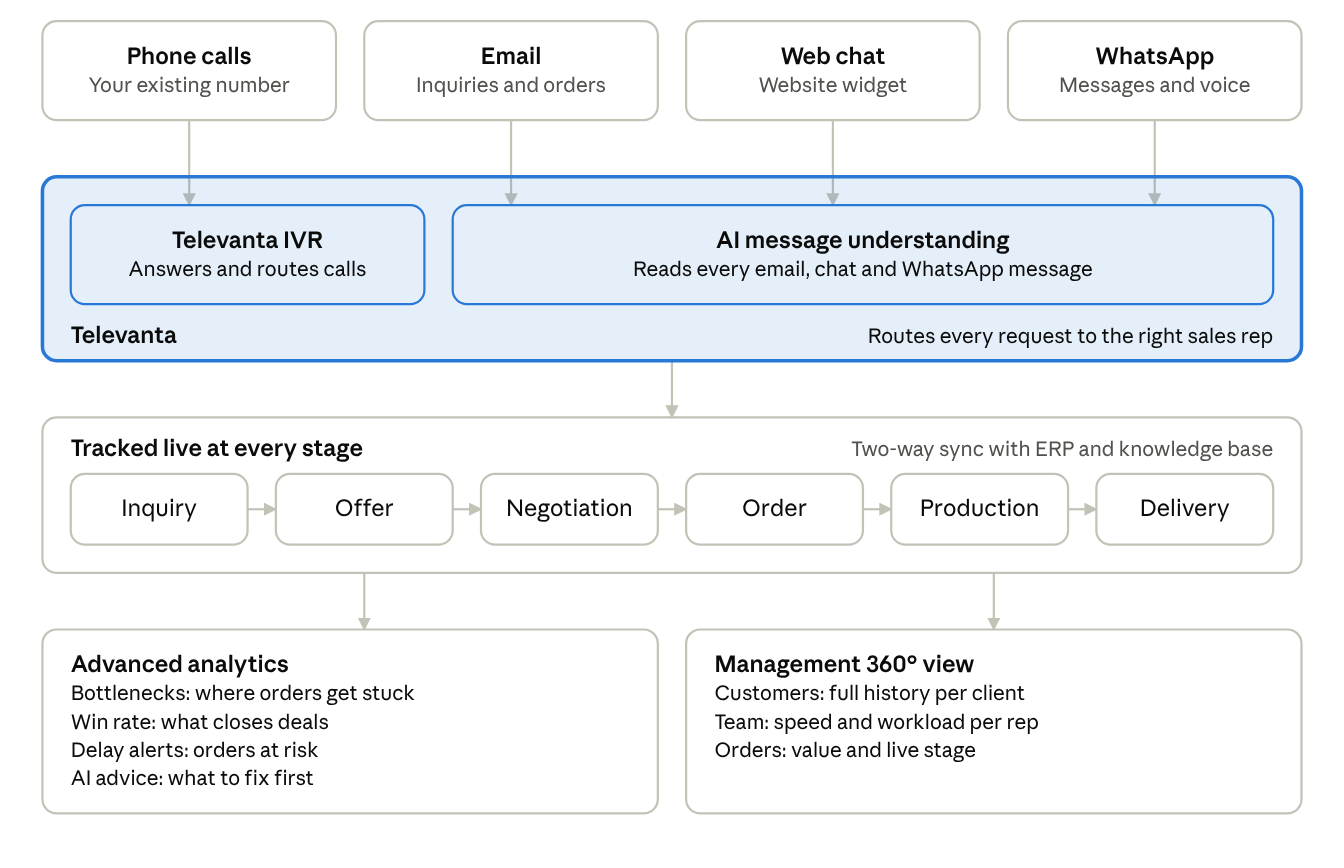
Customers don’t care which channel your team prefers. Some pick up the phone because they’re in a hurry. Others send a long email with a spreadsheet attached, and a growing share start a chat on your website at ten at night. The first job of an automated sales workflow is to catch all of it.
- Email. The AI reads each incoming message and pulls out the details that matter: company, contact, products, quantities, delivery dates. It can read attachments too, so an RFQ sent as a PDF becomes a structured request instead of a file someone has to open and retype.
- Phone calls. Calls are transcribed and summarised as they happen. The caller’s number is matched to an existing customer record, so the system knows who is calling before anyone says hello.
- Web chat. An AI agent answers right away, at any hour. It handles simple questions on the spot and asks a few qualifying questions when the request needs a person.
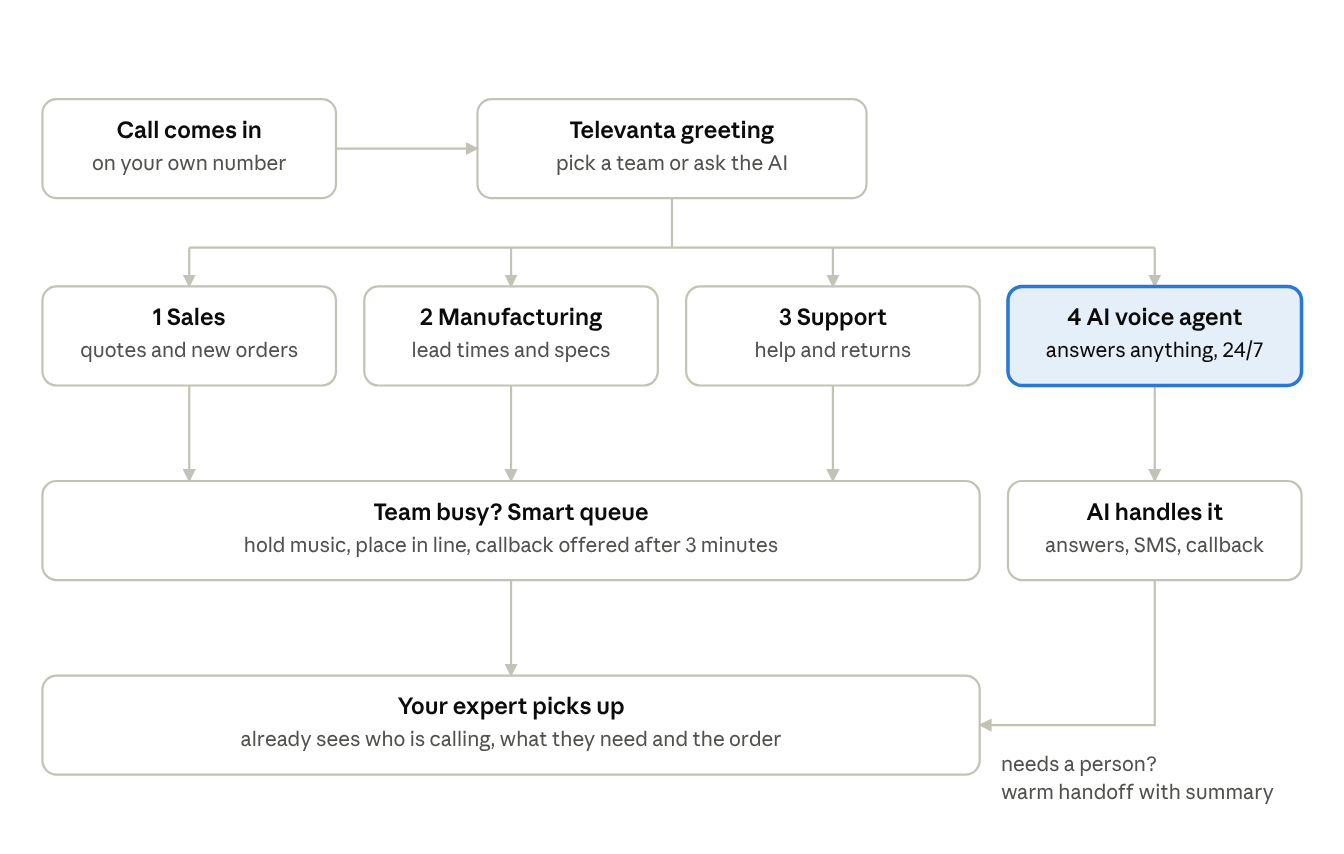
- IVR. Instead of “press 1 for sales, press 2 for support”, a conversational IVR lets callers say what they need in their own words. The system understands the request and sends the call where it belongs.
The important part is what happens next. All of these channels feed one queue, and every request is tied to one customer record. A buyer who emails on Monday and calls on Wednesday about the same order is recognised as one conversation, not two separate tickets handled by two people who never talk to each other.
Step 2: The right person (or AI agent) picks it up
Once a request is captured, the AI works out what it actually is. It looks at intent (new order, price request, reorder, technical question), urgency, language, and the tone of the message. A polite reminder and an annoyed third chase about a late delivery should not land in the same pile.
Routing then combines that understanding with your own business rules. Who owns this account? Which rep knows this product line? Who covers this region, speaks this language, and has room in their day right now? Instead of a shared inbox where the fastest person grabs whatever looks easy, each inquiry goes to the one best placed to handle it.
Not every request needs a human. AI agents can fully handle a lot of routine sales work:
- checking stock and lead times
- quoting standard prices from your price lists
- giving the status of an existing order
- booking a call or a demo with the right rep
When a request is complex or high-value, it moves to a person, and the context moves with it. The rep sees a short summary, the full conversation, the customer’s history and the products mentioned. Nobody has to ask the customer to repeat themselves, which is probably the single most irritating thing a sales process can do.
The hand-off works in the other direction too. A rep who closes a tricky negotiation can pass the follow-up back to an AI agent, which sends the confirmation, chases a missing purchase order and reminds the customer before the quote expires.
Step 3: Qualification, quotes and follow-up run on their own
This is the middle of the sales process, and it’s where deals usually go quiet. A quote gets sent and then nobody looks at it again until the customer has already bought elsewhere.
With AI workflow automation, qualification starts during the first conversation. The AI agent asks about volume, timing and budget in a natural way, scores the lead and adds the answers to the customer record. Your reps start each opportunity knowing roughly how big it is and how soon it might close.
Quotes are built from live data rather than last month’s spreadsheet. Because the workflow is connected to your ERP, prices, stock levels and delivery lead times are pulled in at the moment the quote is created. If a rep wants to offer a discount above their limit, the approval request goes to their manager automatically, with the margin already calculated, and comes back in minutes instead of days.
Then comes the part that humans are worst at: remembering. The workflow schedules follow-ups, notices when a customer has opened a quote but not replied, and flags opportunities that have gone cold. It can suggest the next step or draft the reply, and the rep decides whether to send it. People stay in charge of the relationship. The software just makes sure nothing falls through the cracks.
Step 4: From accepted quote to delivered order, with CX and ERP integration
A lot of sales automation stops at the signed quote. That’s a shame, because the customer’s experience doesn’t stop there, and neither does the risk of losing them.
ERP integration is what turns an accepted quote into an order without anyone retyping it. The order is created in the ERP from the quote data, stock is reserved, and the warehouse or production team gets the job. Invoicing follows the same path. Every manual copy-paste you remove is one less chance of shipping the wrong quantity to the wrong address.
CX integration keeps the customer side of the story in one place. Every call, email, chat and order sits on the same customer profile, so the service team can see exactly what sales promised and when. Customers get updates on the channel they actually use: an order confirmation by email, a dispatch notice by SMS, a delivery-day message in the chat they started with.
After delivery, the workflow keeps going. It can send a short satisfaction survey and open a service case if something arrived damaged. For products that run out on a predictable cycle, it can send a reorder reminder just before the customer needs one.
This is why integration matters so much. Without it, AI can only answer questions. With CX and ERP connected in both directions, it can take action: check, reserve, order, update and confirm, using the same data your teams rely on.
Deep analytics and a full view of the sales flow
When every step runs through one workflow, every step leaves data behind. That’s the benefit many companies don’t expect when they start with AI workflow automation, and it often ends up being the most valuable one.
In a typical sales team, the numbers live in different places. The phone system knows call volumes, the CRM knows the pipeline, the ERP knows revenue, and nobody can easily connect them. You can see how many orders shipped last month, but not how many inquiries it took to get there or where the rest were lost.
An automated flow joins those dots. Here are a few of the questions it can finally answer:
| Question | What the workflow shows |
|---|---|
| Where do our customers come from? | Inquiries, conversions and revenue by channel: email, phone, chat, IVR |
| How fast do we respond? | First response time and time to quote, per channel, team and rep |
| Where do deals stall? | Conversion and average time at each stage, from inquiry to delivered order |
| How much does AI handle? | Share of requests resolved by AI agents and how often they hand over to a person |
| How long does fulfilment take? | Time from accepted quote to order, dispatch and delivery |
| Why do we lose? | Loss reasons pulled from real conversations, not just a dropdown filled in at the end |
Conversation analytics adds another layer. Because the AI reads and listens to every interaction, it can spot patterns no one has time to notice by hand: a product that suddenly gets asked about a lot, a competitor name that keeps coming up, or a delivery complaint that repeats in one region. All of it sits in one dashboard that follows the sales flow from first contact to final delivery.
Better data, better management decisions
Visibility on its own doesn’t change much. What changes things is managers being able to act on facts instead of impressions from the Monday meeting. Here is what that looks like in practice.
Staffing that matches demand. If chat inquiries spike between 6 and 9 p.m. while phone volume drops after lunch, you can move people, or let AI agents take the evening shift, instead of guessing.
Fixing real bottlenecks. Maybe quotes go out quickly but discount approvals sit for two days. Maybe orders are confirmed fast but dispatch is slow in one warehouse. When each stage has its own timing, the slow one is obvious, and you can fix the process rather than blame the sales team.
Smarter pricing. Win rates by product, customer segment and discount level show where you’re leaving money on the table and where a small concession actually closes deals.
Earlier demand signals. Inquiries arrive well before orders do. If requests for a product start climbing, purchasing and production can plan ahead instead of reacting to a stock-out.
Fairer, more useful coaching. With every conversation summarised and scored, managers can see what top performers do differently and share it, using real examples rather than gut feeling.
Forecasts you can trust. Because the pipeline is tied to live ERP data on stock and capacity, a forecast reflects what you can actually deliver, not just what sales hopes to close.
There’s also a quieter benefit. Once you can see the whole flow, it becomes easy to decide what to automate next. You simply start with the step that costs the most time or loses the most deals.
How Televanta brings it together
At Televanta, we built our platform around a simple idea: a sales process should feel like one continuous conversation, both for the customer and for your team. Email, phone, web chat and IVR come into one place. AI agents handle the routine work and hand complex requests to the right person, with full context. And because Televanta connects with your CX and ERP systems, the workflow doesn’t end at the quote. It follows the order all the way to delivery.
Managers get a single view of the entire sales flow, from the first inquiry to the delivered order, with the analytics to see what’s working and what isn’t.
If you’re thinking about AI workflow automation for your own sales team, we suggest starting small:
- Map your current flow. Write down every step an inquiry takes today, including the informal ones like “I’ll ask the warehouse on Teams.”
- Pick one high-volume step. Order status questions or standard quotes are good candidates, because they’re frequent and easy to measure.
- Connect your core systems. Integration with your CX platform and ERP is what lets the automation act, not just talk.
- Measure before and after. Response time, conversion and time to delivery will tell you quickly whether it’s working.
- Expand from there. Once the first step runs well, add the next one.
The bottom line
Go back to the customer who emailed at 9:14. With an automated sales workflow, their message is read within seconds and matched to their account. Stock is checked in the ERP, and a quote goes out before the coffee gets cold. If they have a question the AI can’t answer, the right rep calls them back, already knowing what they asked for.
When they accept, the order flows into production and delivery without being typed in twice. Every step shows up on a dashboard that tells the sales manager exactly how the business is doing.
That’s what AI sales workflow automation really is: fewer gaps, faster answers and a clear view from inquiry to delivered order. If you’d like to see how it would work with your channels and systems, get in touch with the Televanta team and we’ll walk you through it.
Created on
Antonio Lupieri is an agentic AI leader at Televanta, where he helps businesses automate customer communication across phone, chat, WhatsApp and email. On the blog, he writes about AI voice agents, intelligent IVR, chatbots, WhatsApp bots and AI email assistants.